
Fund recipients from a received gift
Updated last week
Use Fund recipients on a received gift to allocate that gift's money to specific recipients. A funder supplies the money, a sponsor holds the relationship with the recipient, and a recipient receives the support. One received gift can cover several recipients even when different people sponsor each of them.
Funding allocates the existing gift. It does not charge anyone again, does not create another donation or send another receipt, and does not itself create sponsor relationships.
Before you start
You need a role with permission to manage donations and access to the program the recipients belong to.
Eligible money is what remains of the received gift in your organization's base currency after refunds and money you have already allocated. Each allocation reduces the gift's available balance.
Allocate the gift to recipients
You can start from the gift as described below. To start with a recipient roster instead, select the recipients on the Recipients worksheet and choose Fund selected recipients; see the bulk funding guide below.
Open the funder's donor record and go to Transactions > Donation History. You can also find the gift from the Donations table.
Open the gift and select Edit Donation, then Fund recipients.
Review What this gift funds and the amount not yet applied.
Search for and select the recipients. Unsponsored only starts checked; clear it to include recipients who already have sponsors.
Choose Coverage starts and, optionally, Coverage ends. A number-based program requires an explicit coverage period.
Select Preview. The preview is read-only: check the recipients, the per-recipient amounts, the coverage dates, any partial coverage and remainders, and the unallocated balance.
Fix any problems the preview reports, then select Apply gift. If you change recipients or dates, preview again first.
After applying, check What this gift funds for the saved recipients, amounts, dates, and remaining balance.
End or reverse an allocation
Open Fund recipients on the same gift to review its existing allocations and to end or reverse one of them.
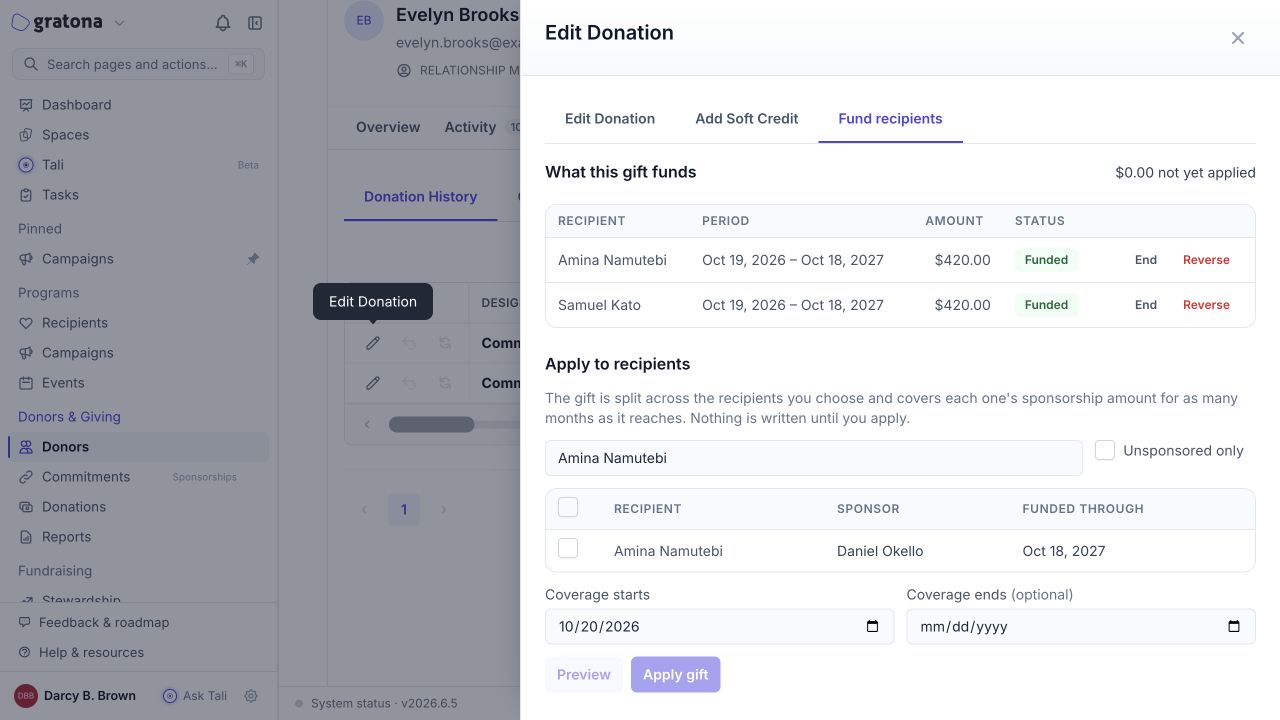
End asks for a date in YYYY-MM-DD format inside that funded period and shortens the coverage's end date. The allocated amount and the funding history are preserved. Ending coverage immediately returns any resulting unconsumed amount to the gift's available balance.
Reverse removes that gift's coverage for the row and keeps a reversed entry in the funding history. The freed allocation can be applied again. Reverse is not a payment refund.
What gift changes do to funding
Not every gift edit reverses funding.
Increasing a gift, or changing its notes, date, or designation, keeps the coverage the gift already funds.
A reduction or refund keeps the allocations the remaining amount can afford and trims the latest coverage first, at the rate saved with each allocation. Released rows stay in the funding history with a reason.
If an edit would leave insufficient money for the coverage already used before staff ended an allocation, Gratona blocks that correction for review.
A refund is still recorded, and any conflict with the coverage that existed before staff ended an allocation is flagged for staff review.
Deleting a gift reverses its funding.