
FIELD GUIDE 02 / DONOR WELCOME
The Second Gift Starts Here
Decide who gets personal time this week, and send a welcome every new donor can count on.
A first gift tells you what someone funded and how the gift arrived. It rarely tells you why. Most teams can’t follow up personally with every new donor, so the useful decision comes before any message: what you already owe, who has told you what they want, and how many hours each person actually has.
Riverbend Reading Project and everyone in this guide are invented.
Count what you owe before choosing who to call
On Monday, September 14, Leah, the development director, plans the week’s first-gift follow-up. After her existing commitments she has two hours for it. Maya, in donor support, has three. Sixteen first gifts arrived last week, and Priya, who gave the week before, has asked a question.
| Who | What the record says | Kind of work | Owner | Time |
|---|---|---|---|---|
| All sixteen new donors | Gift, receipt status and preferences | Shared: one checked welcome template | Maya | 60 min |
| Nine donors, including Priya | Asked on the gift form for the October update | Shared: one verified update serves all nine | Maya asks Luis, the program lead | 15 min |
| Priya | Replied to her welcome: how are tutors trained? | Owed answer | Maya, with facts from Luis; due September 18 | 45 min |
| Noor | $50 in memory of a friend; asked that the family be told | Owed notification | Maya | 30 min |
| Grace | $40 through board member Tom’s birthday fundraiser; asked that Tom be told | Owed note | Maya | 15 min |
| Leon | $2,500 after a program briefing, where he asked how the sessions connect to the program’s next stage | Stated interest | Leah | 60 min |
| Marcus | $1,000 online; no note, preference or connection | Potential; reason unknown | Leah | 45 min |
The welcome and the October update are shared work: one checked template or one verified update serves many donors, so each costs little per person. Priya, Noor and Grace are each owed something individual. None of it is a conversation, but it comes first, and it fills half of Maya’s follow-up time.
Leon and Marcus are choices. Leon has said what he wants to understand, so his conversation has a subject. Marcus gave the largest gift with no stated reason. Its size justifies Leah’s time, but tells her nothing about what he wants to hear, so the call’s job is to ask what prompted it. Planned: Maya 2 hours 45 minutes of 3; Leah 1 hour 45 minutes of 2. Luis has separately reserved time for the program facts; asking him does not make that work free.
Wednesday: a question nobody planned for
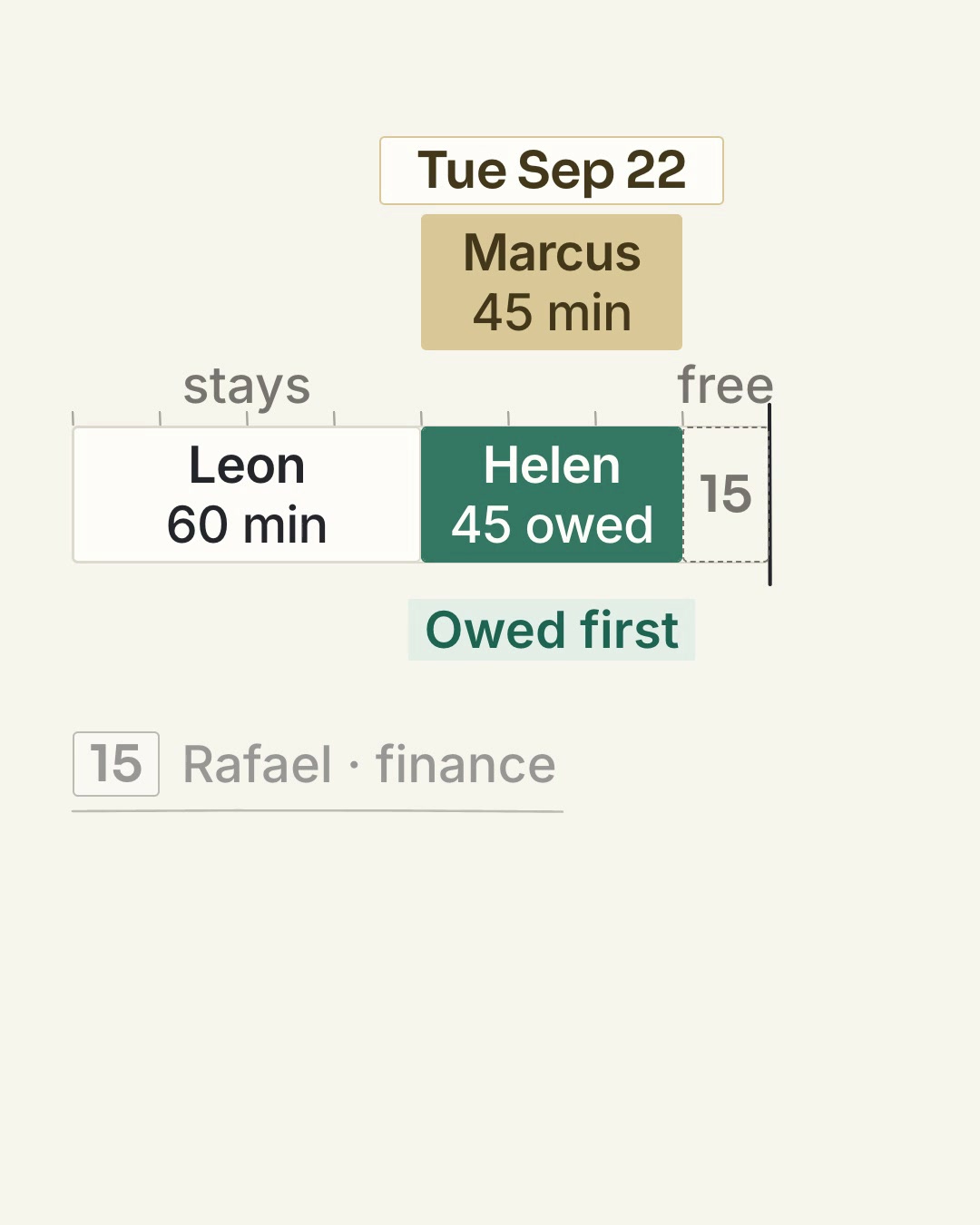
Helen, one of last week’s donors, replies to her welcome. She wants to know what share of her $200 goes to administration. The answer is owed. Rafael in finance can pull the figures from the latest statements in fifteen minutes; acknowledging Helen, checking the figures and writing a reply she can rely on takes about 45 minutes more. Maya and Leah each have fifteen minutes left.
Leah looks for something that can move. The welcome is the floor every donor gets, so it stays. Maya’s remaining work is owed to Priya, Noor and Grace. Marcus’s call is the only discretionary item: nothing was promised to him, and he has been thanked. Leah moves his call to Tuesday, September 22, and takes Helen’s reply herself.
Read the transcript
Leah moves the thousand-dollar donor's call to next Tuesday. The two-hundred-dollar donor's answer gets the time this week. Rewind to Monday. Leah has two hours: an hour for Leon, forty-five minutes for Marcus, and fifteen spare. Then Helen asks what share of her gift goes to administration. Rafael needs fifteen minutes to pull the figures. Leah needs forty-five minutes to acknowledge the question, check the figures, and write the reply. She's thirty minutes over. Marcus has already been thanked. No call was promised. His call moves to September twenty-second, and Helen's answer takes that slot. Leon stays. Fifteen minutes are still free. Count the answers you owe before adding another conversation to the week.
Leah moves the thousand-dollar donor's call to next Tuesday. The two-hundred-dollar donor's answer gets the time this week. Rewind to Monday. Leah has two hours: an hour for Leon, forty-five minutes for Marcus, and fifteen spare. Then Helen asks what share of her gift goes to administration. Rafael needs fifteen minutes to pull the figures. Leah needs forty-five minutes to acknowledge the question, check the figures, and write the reply. She's thirty minutes over. Marcus has already been thanked. No call was promised. His call moves to September twenty-second, and Helen's answer takes that slot. Leon stays. Fifteen minutes are still free. Count the answers you owe before adding another conversation to the week.
Each person’s week, after Helen’s question.
75 min shared (welcome batch, update request) · 90 min owed to Priya, Noor and Grace · 15 min left
45 min owed to Helen · 60 min for Leon’s conversation · 15 min left
- Shared work
- Owed to one donor
- Chosen conversation
- Unplanned
Moved to September 22: Marcus’s 45-minute call. Nothing was promised to him, and he has been thanked.
Thursday: a date that has to move
Luis tells Maya the tutor-training handbook is being revised until September 23. He can’t give a reliable description of the training before then. Maya promised Priya an answer by September 18, so she writes before that date passes:
The record keeps both dates: the September 18 promise and the September 25 date Priya now has. Defer chosen work before moving an owed date. When owed work alone doesn’t fit, tell the donor the new date before the old one passes.
The welcome every new donor gets
Every new donor gets this welcome, merged from one checked template. It thanks them accurately, settles the receipt question and names a person to reply to. It doesn’t claim that one gift produced a particular result. Priya’s, sent September 9:
Change only what the record supports: amount, designation, one-time or monthly, and any request the donor made. Drop the update paragraph for donors who didn’t ask for one. A good welcome keeps the organization’s side of the exchange; it can’t tell you whether someone will give again.
Schedule the shared update once
Nine donors asked for the October update. One verified update answers all of them:
| When | Owner | Work to finish | Record when complete |
|---|---|---|---|
| September 14 | Maya, donor support | Ask Luis to verify the October update and agree his date. | Request sent; Luis’s agreed date. |
| October 8 | Luis, program lead | Verify the reporting period, figures and permitted details. | Approved text and source references. |
| October 10 | Maya | Check approval; resolve anything missing before the deadline. | Ready to send, or the blocker and next action. |
| By October 15 | Maya | Send the update to the nine donors who asked. | Message, recipients and send time; any delivery failures. |
If Luis’s check slips, tell the nine donors before October 15 what is late and when to expect it. Moving the internal task date doesn’t update anyone.
When the record says something different
The gift is monthly. Confirm the recurring amount and status from the gift record, and replace the one-time wording with “Thank you for starting a monthly gift of [verified amount].” Include the actual route to change or stop the gift. Check that the first payment went through before anything else; the next gift is already scheduled, so it isn’t a new decision to give.
Communication preferences are unknown. Record “unknown” and use only the route your organization has established for acknowledgements. An email address isn’t newsletter permission. If it helps, offer a way to state preferences without requiring a reply.
The donor asks you to stop. Apply the preference to every list and sequence, then tell them it’s done. A polite reply doesn’t fix an unchanged mailing list.
Plan your own week
Fill in each person’s hours first. List what is owed, then shared work, then chosen conversations in order until the hours run out.
Keep both in your team’s approved system, so the next colleague can see what the donor asked for, what was promised and what moved.
If your team is setting this up in Gratona, explore Journeys and assigned work. Check the enrollment and the tasks each configured step creates so the handoff has an owner and a visible result.
TAKE IT TO YOUR TEAMThe week’s plan and the welcomeEditable guide · Completed allocation, welcome email, schedule and blank recordsFurther reading: Randall Hallett on second gifts and a relevant welcome, and the Gratona field notes What the first gift can’t tell you, which read six first gifts in depth. The allocation, messages and schedule here are original Gratona examples.
Explore the reading list ↗