
FIELD GUIDE 05 / RETENTION
Before You Call Them Lapsed
Reconcile the donor count before choosing who to contact.
You have 75 donors this year and 100 last year. Twenty are new. Does that mean retention is 55%?
Only if every other current donor also gave last year. Donors returning after a gap can make that shortcut wrong.
All figures below are fictional. The example compares the complete calendar years 2024 and 2025.
Read the transcript
Before you report 55 percent retention, check who you subtracted. Last year, 100 people gave. This year, 75 gave, and 20 of them were giving for the first time ever. Seventy-five minus twenty is fifty-five, so the shortcut says 55 percent. But 10 of those people gave in an earlier year, skipped last year and returned. They were never on last year's list, so they can't count as retained. Match last year's donor IDs against this year's, and 45 gave in both years. Retention is 45 percent. Report the 10 returning donors as a result of their own. That leaves 55 of last year's donors with no gift this year. Before any lapsed-donor letter, check each record for a failed card, a changed ID, a giving schedule or a request for no contact.
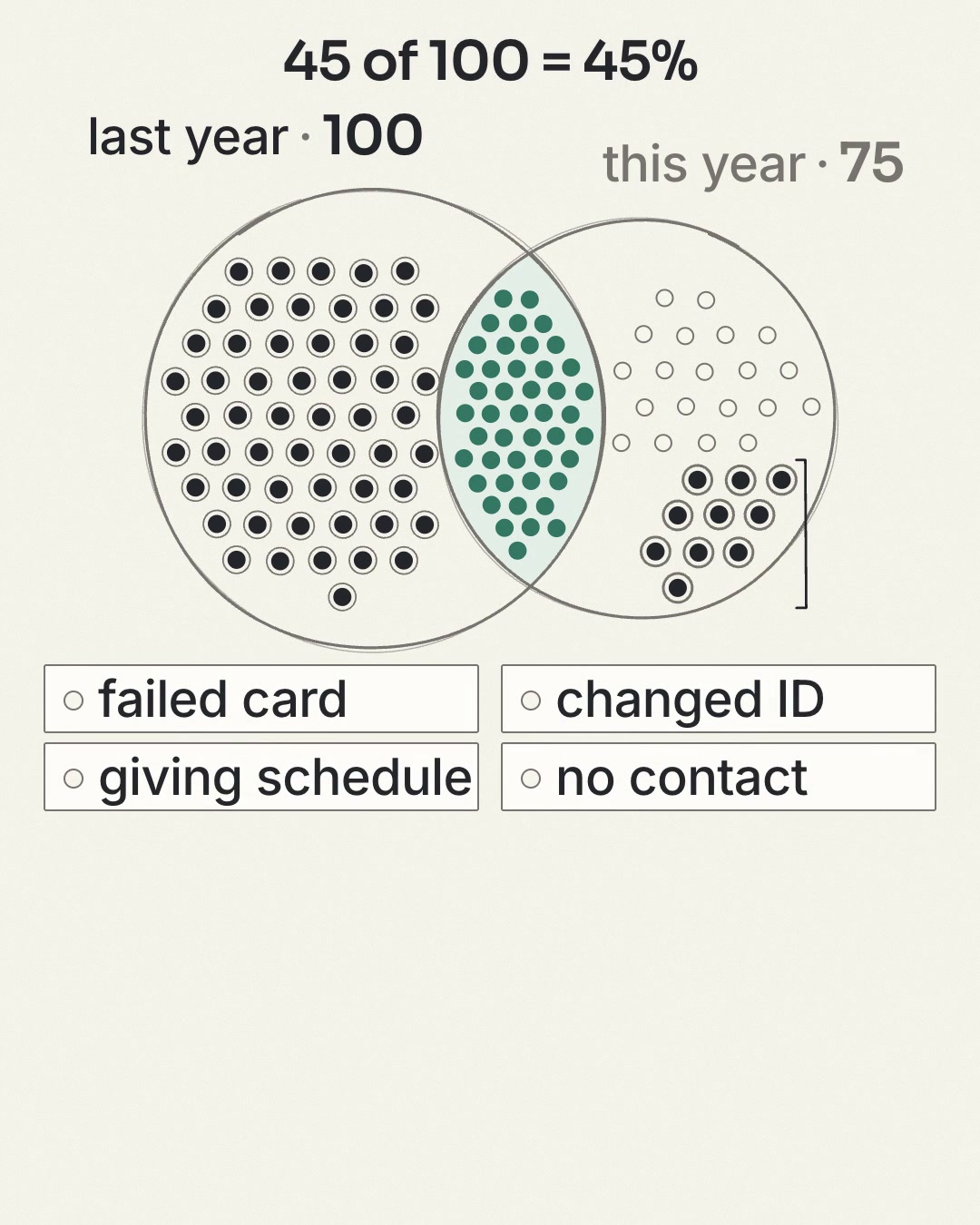
Before you report 55 percent retention, check who you subtracted. Last year, 100 people gave. This year, 75 gave, and 20 of them were giving for the first time ever. Seventy-five minus twenty is fifty-five, so the shortcut says 55 percent. But 10 of those people gave in an earlier year, skipped last year and returned. They were never on last year's list, so they can't count as retained. Match last year's donor IDs against this year's, and 45 gave in both years. Retention is 45 percent. Report the 10 returning donors as a result of their own. That leaves 55 of last year's donors with no gift this year. Before any lapsed-donor letter, check each record for a failed card, a changed ID, a giving schedule or a request for no contact.
The answer you can explain
| Group | Donors | Where they belong |
|---|---|---|
| Gave in both 2024 and 2025 | 45 | Retained donors. |
| First-ever gift was in 2025 | 20 | New donors; outside the 2024 cohort. |
| Gave before 2024, skipped 2024, gave in 2025 | 10 | Returning donors; outside the 2024 cohort. |
| Gave in 2024, no qualifying gift in 2025 | 55 | Members of the prior cohort to investigate. |
75 donors this year. 45 retained.
45 retained + 55 absent in 2025 = 100
45 retained + 20 first-ever + 10 returning = 75
The 10 returning donors skipped 2024.
They do not belong in its retained count.
Subtracting the 20 new donors from 75 gives 55. That includes ten returning donors who were never in the 2024 cohort, so the shortcut overstates retention by ten points.
A paragraph for the board report
The board needs the result in plain words. Whoever checks the figure needs the method. Keep them apart.
If you don’t have enough history to separate first-ever from returning donors, the board paragraph says “30 donors who did not give in 2024; we are still checking their earlier history.” Don’t label them all new.
When the mix changes, the rate moves
Overall retention can fall even when every group of donors behaves exactly as before. If first-year donors return at a lower rate than donors with a longer history, a prior cohort with more first-year donors produces a lower overall rate. This fictional arithmetic example keeps both group rates fixed:
| Prior-period cohort | First-year donors retained at 25% | Repeat donors retained at 60% | Total retained |
|---|---|---|---|
| A: 20 first-year, 80 repeat | 5 of 20 | 48 of 80 | 53 of 100 (53%) |
| B: 40 first-year, 60 repeat | 10 of 40 | 36 of 60 | 46 of 100 (46%) |
Same group rates. Lower overall rate.
First-year: 5 of 20 retained (25%) · Repeat: 48 of 80 (60%) · 53 of 100
First-year: 10 of 40 retained (25%) · Repeat: 36 of 60 (60%) · 46 of 100
Neither group’s rate changed. The mix did.
The overall rate falls seven points, and neither group did anything differently. A year with more first-time donors can produce a cohort like B. Read alone, 46% looks like a stewardship problem. Read by group, it moves the board’s question from “what went wrong?” to “how do we keep more first-year donors?”, and it points effort at the second gift rather than at repeat-donor stewardship that is holding steady.
When the prior cohort’s mix has shifted, report the first-year and repeat rates, with their counts, beside the overall rate. First-year donors are prior-period donors with no earlier gift, so each split needs complete history before the prior period. The comparison tool below gives the split for one pair of periods when you mark that history complete; run it once for each pair you want to compare. The table above is worked arithmetic, not tool output.
Get two lists that mean the same thing
Before exporting, complete this note with the person who owns the report:
| Decision | Record your rule |
|---|---|
| Periods | [Start and end dates for each period.] |
| Donor identity | [Individual, household or organization; stable ID field.] |
| Qualifying gifts | [Included gift types and how refunds, reversals and intermediaries are treated.] |
| Credit | [How direct gifts and soft credits are treated without counting the same relationship twice.] |
| Date used | [The gift date field applied consistently to both exports.] |
| Report source | [Report names, filters and export date.] |
Use received gifts rather than unpaid pledges for this calculation. If you need a different metric, name it separately. For an unfinished year, use a clearly defined year-to-date comparison with the same cutoff in the previous cycle; do not present it as completed annual retention.
Export one stable donor ID per line for each period. Keep names, emails and gift notes out of the comparison lists. Duplicates in transaction exports should not create extra donors.
Know which history each label needs
| Label | What you need | Without it |
|---|---|---|
| Retained, absent | The prior and current lists | No rate. |
| Returning | A gift on record before the prior period | Partial history still proves the donors it contains. Call the rest not yet classified. |
| First-ever | Complete history before the prior period, and no gap between the two periods | Not yet classified. A missing record isn’t a first gift. |
| Gave just after the period closed | Gifts received after the current period ended | Check before any outreach. These gifts never change the closed period’s rate. |
Periods that aren’t adjacent leave a gap nobody has observed. Compare 2023 with 2025, and a current donor with no gift in 2023 or earlier may still have given in 2024. Check the gap year too, or report those donors as not yet classified.
Calendar boundaries create absences of their own. A donor who gave on December 20, 2024 and again on January 5, 2026 gave about a year apart, yet counts as absent from 2025. The rate for 2025 stays as it is, but that donor isn’t a candidate for lapsed-donor outreach.
Check the match with a tiny example
The intersection is EXAMPLE-102 and EXAMPLE-104: 2 ÷ 4 = 50%. EXAMPLE-101 and EXAMPLE-103 are absent from the current list. EXAMPLE-105 needs older history before you can call it new or returning.
If the prior-period list is empty, retention is undefined. Report “no eligible prior cohort,” not 0%.
The comparison matches exact, case-sensitive IDs, ignores duplicate lines and trims surrounding spaces. It won’t guess that two different IDs are the same donor. If a migration changed IDs, reconcile the old and current IDs in your records, then paste the corrected lists before relying on the result. Use these CRM migration acceptance checks to check record counts, attribution, and history before comparing periods.
Start with the fictional example below, or replace it with your periods and anonymous stable donor IDs, one per line. Exact matches are case sensitive. Repeated IDs and extra spaces are ignored. The optional sections below separate new from returning donors, check later gifts and record whether identities are reconciled.
Earlier giving history (optional): not added
Donors with a qualifying gift before the prior period starts. A match confirms a returning donor. Only complete history, with periods that meet, can show that a donor is giving for the first time.
Gifts after the current period (optional): not added
Shows which absent donors have given since. It informs follow-up and never changes the closed-period figures.
Donor identity check: reconciled
Duplicate, merged or migrated records can change both the number of prior donors and the number retained. Reconcile them in every list, then compare again.
Method notes for finance or data staff
A current-only ID is called first-ever only when complete earlier history and periods that meet support it. Inputs stay on this page and disappear on reload.
Turn a missing ID into an investigation
| What you find in the record | What happens next |
|---|---|
| A scheduled recurring payment failed | Check the payment status and the appropriate support response with the responsible person. |
| Giving moved to a household, business or new ID | Resolve the identity rule and recalculate before interpreting the change. |
| A multi-year giving schedule explains the gap | Record the agreed timing; do not assume a missed annual gift means the relationship ended. |
| The donor asked for a pause or no contact | Preserve that preference. Absence does not override it. |
| There is no clear explanation | Have the relationship owner review the history and choose an appropriate next step. |
A completed record for one absent donor:
Close the review when every absent ID has a finding and an owner. Then report the count for each finding next to the rate, so the board sees how many absences were payments, record changes or timing.
Definition reference: Fundraising Effectiveness Project terminology. The examples and report wording are original Gratona tools.
Explore the reading list ↗