
Manage DAF sponsors, IRA custodians, and institution locations
Updated last week
Use Donors > DAF and IRA to manage giving institutions: organization records classified as DAF sponsor or IRA custodian, and the named office locations recorded on their DAF and QCD gifts. This guide covers the three organization types, the Your organizations and Directory sections, and institution locations.
Before you start
Adding or linking an institution and editing profiles require donor-management access. Viewing a profile requires profile-view access, and merging duplicate institutions additionally requires duplicate-management or donor-management access. If an action is missing, your role may not include it.
Understand the three organization types
Every organization donor record has an Organization type with three values:
Regular organization: an organization that gives its own funds, such as a church or company. This is the classification for ordinary organizations.
DAF sponsor: a donor-advised fund sponsor your organization records grants from.
IRA custodian: a firm that holds a donor's individual retirement account.
A new giving institution is not an ordinary supporter record. It has no donor portal access, creating one needs no donor-login credentials, and Gratona sends no account-setup email for it. A contact email on an institution is optional and is not a login. Converting an organization that already has portal credentials preserves its existing account controls.
Open the DAF and IRA tab
Open Donors from the sidebar.
Select the DAF and IRA tab.
Use Donor form to choose the donor form you are working in.
The tab shows Your organizations (institutions added to the selected donor form) and Directory (a shared list of known DAF sponsors and IRA custodians). Use Search organizations and the Organization type filter, which offers All organization types, DAF sponsors, and IRA custodians, to narrow either list.
Your organizations and the shared Directory
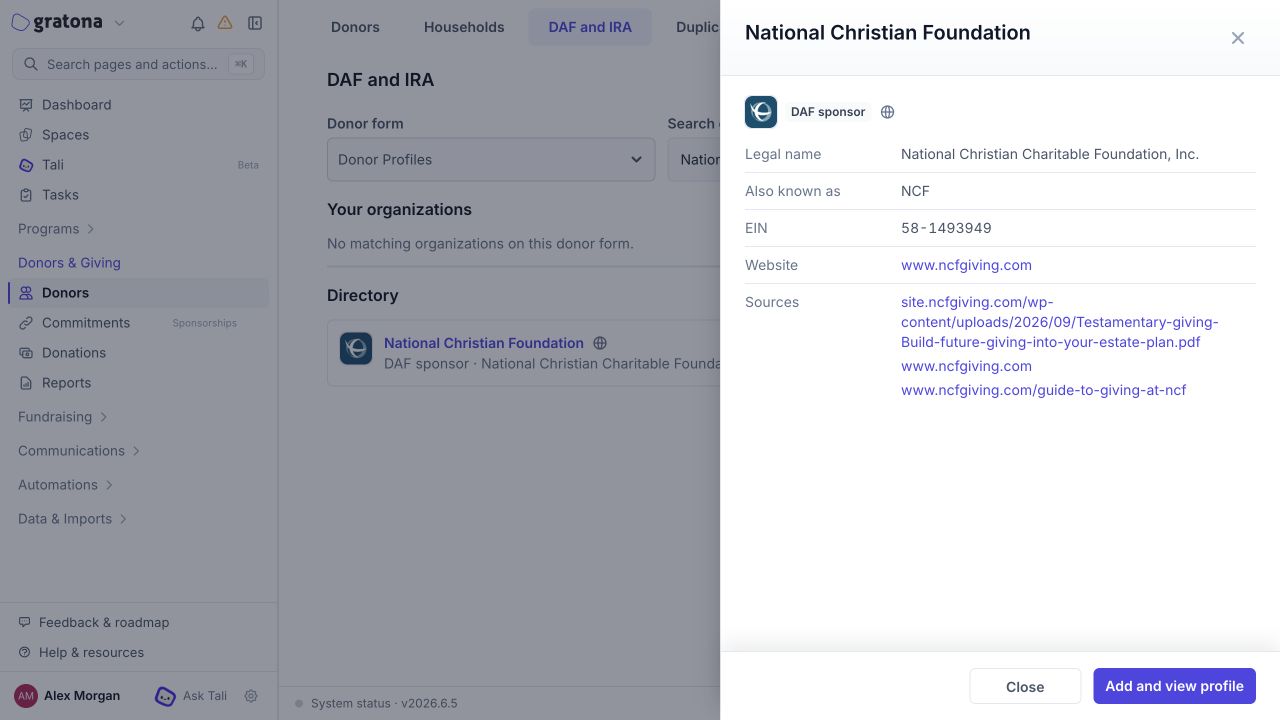
The Directory is reference metadata about known institutions. It is not a provider connection: selecting a directory entry does not connect Gratona to the sponsor or custodian, and no grants or distributions flow through it.
Browsing the Directory or opening an entry's details creates no profile on any donor form. A profile is added or reused only when you take an explicit action:
Add and view profile in a directory entry's details adds the entry to the selected donor form, reusing a matching profile when one already exists, and opens the profile.
Add organization creates a new institution record.
In the DAF sponsor and IRA custodian pickers on the donation form, Add to this donor form adds the selected entry to the donor form you are recording the gift on.
Directory reuse does not merge historical duplicates or match an institution in another CRM automatically.
Add an institution
Quick-add an institution from the DAF and IRA tab, or create it with the full form from the Donors page.
Quick-add from the DAF and IRA tab
On the DAF and IRA tab, select Add organization.
Choose the Organization type: DAF sponsors or IRA custodians.
Search by Institution name. Reuse an existing profile if it represents the same institution, or open a Directory result and choose Add to this donor form.
If no result matches, choose Add institution "name" to create the profile. Selecting or adding the institution closes the drawer; review any duplicate warning before continuing.
No username, password, or email address is required, and no account-setup email is sent. Before adding a new institution, check whether a matching profile or directory entry already exists and reuse it instead.
Full form from the Donors page
To enter contact details and custom fields at creation time, use the full donor form instead.
Open Donors and select Add Donor.
Choose the Organization donor type, then select the Organization type: Regular organization, DAF sponsor, or IRA custodian.
Enter the Organization name and any contact details or form-required fields, then submit.
Contact details and custom fields you skip at creation can be added later on the profile: open the institution's profile and edit it there.
Change an existing organization's classification
Change classification in the donor profile editor. Open the organization's profile, select Change organization type in the profile header, or open the edit drawer and use the Organization type selector. Choose Regular organization, DAF sponsor, or IRA custodian, then save.
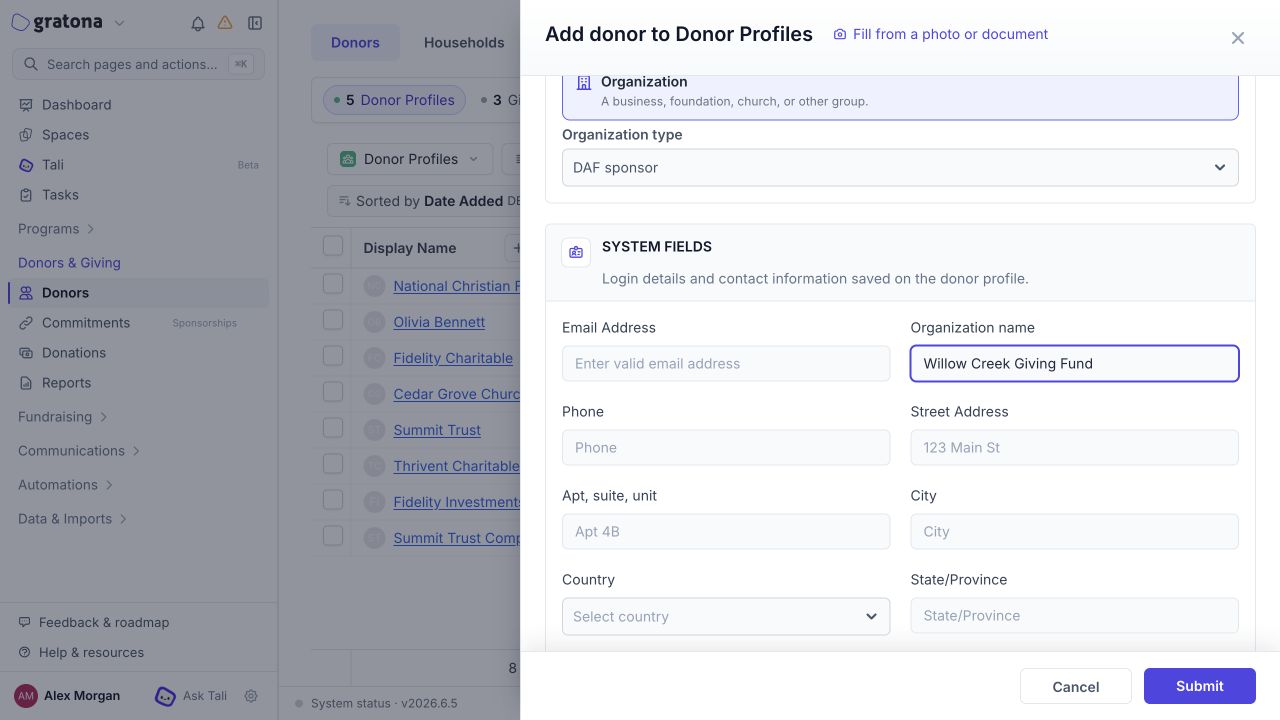
A legacy institution whose type was never specified shows a locked Giving institution, type not specified choice until you select one of the three types. If an organization's name is missing, enter it in Organization name, the system name field, rather than only in a legacy custom name field.
Manage institution locations
Locations are named offices, such as branches, attached to an institution. Open them from the institution's row in Your organizations with Locations, or open the institution's profile, select Open donor details, and choose Institution locations in the details rail. Both open the same locations drawer.
Select Add location.
Enter a Label, such as the branch or office name. The label is required.
Optional: enter the address using Street, Address line 2, City, State/Region, ZIP/Postal code, and Country.
Optional: check Propose this location for new gifts (default) to propose this office for new DAF and QCD gifts.
Save the location.
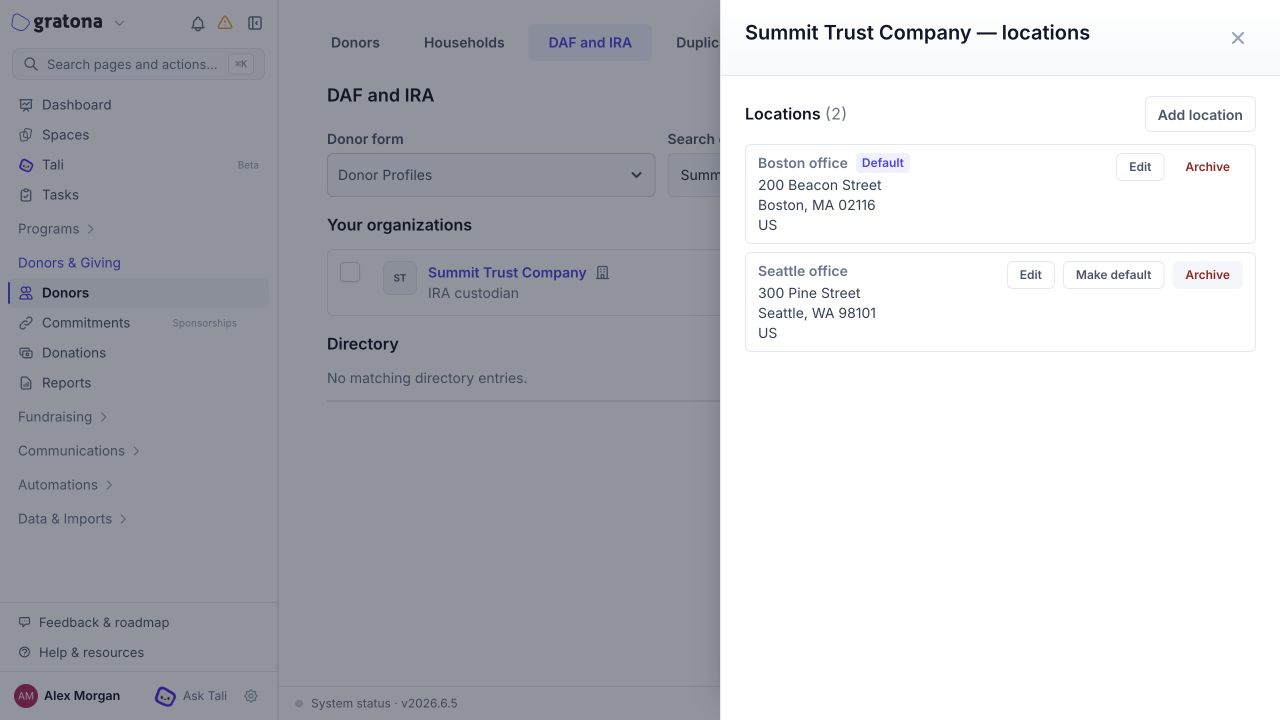
Each location row offers Edit and Archive. The current default shows a Default badge, and other locations offer Make default. Archiving keeps gifts already recorded with the location readable, but the location can no longer be chosen for new gifts. If you archive the default, new gifts have no location proposed. Distinct legal entities are separate profiles and are not merged merely because their names resemble; see Donor Duplicate Detection.
Record a location on a received DAF or QCD gift
When you record a DAF grant or an IRA/QCD gift and select the institution, the form shows Location (optional). Choose one of the institution's active locations or leave Not recorded; the default location is marked (default) in the list. See Record a received DAF grant and Record a received IRA/QCD gift.
One selected location applies to the whole received payment, including every split allocation. The saved gift keeps the location name and address recorded when it was saved: later location edits, default changes, and archiving do not rewrite it. Archived locations cannot be selected for new gifts, and existing gifts are never auto-filled with a location.
Where location details appear
Donation exports and reports can include the recorded location fields for eligible gifts: label, formatted address, street, address line 2, city, state/region, postal code, and country. Values come from each gift's saved snapshot rather than the institution's current profile, so they can differ from the profile after later edits. The DAF grant, IRA/QCD, and soft-credit receipt variants can also include the recorded office name and address.